Interface preview
What it is
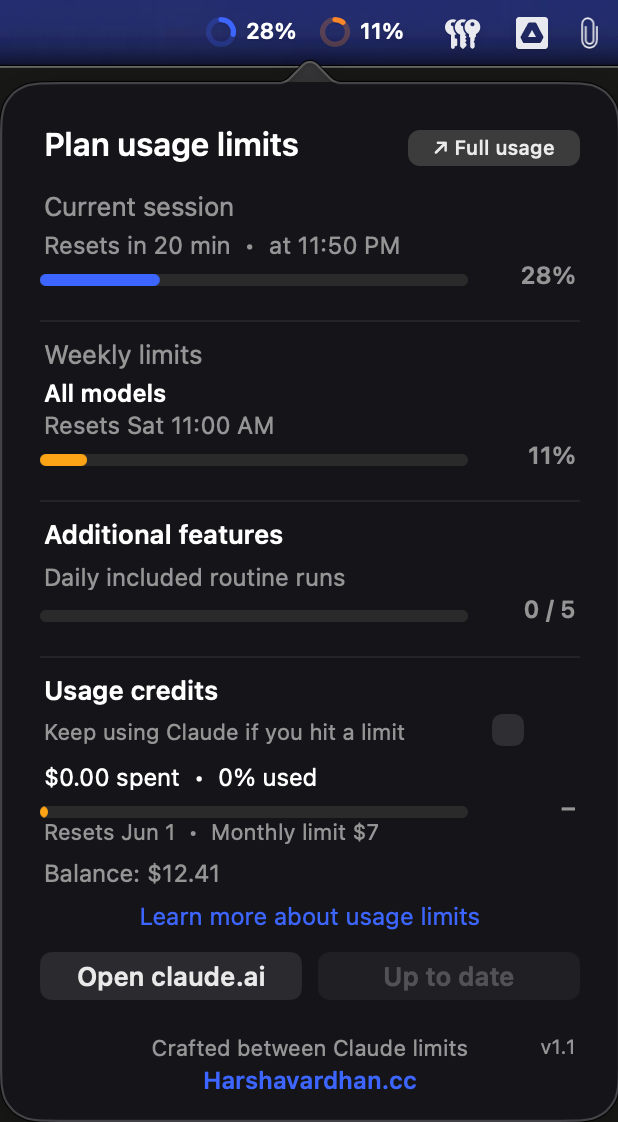
If you live in Claude all day, you constantly wonder: how close am I to my 5-hour limit? My weekly cap? How much prepaid credit is left? Today the only way to check is to open claude.ai and dig through settings. Gauge puts that answer in your menu bar — two small rings you can glance at any time, no browser, no tab-switching.
How it works
- You sign in with your own Claude account inside a private, sandboxed web view. Your session lives only on your Mac — Gauge has no server and sends your data nowhere.
- It reads the same usage numbers the Claude website shows you and renders them as live progress rings that refresh on a timer.
- A red sonar-pulse alert ripples out from a ring when you're near a limit, so you notice before you get cut off mid-task.
- It updates itself. When a new version is published, an in-app Update button glows red; one click downloads the new build, verifies its Apple code signature, swaps the app, and relaunches — no reinstall.
Key features
- At-a-glance rings — session and weekly usage as rings, plus your credit balance, always visible in the menu bar.
- Near-limit alert — a calm red pulse instead of a surprise lockout.
- One-click auto-updater — signed, notarized builds delivered straight to the app.
- Private by design — your Claude session cookies stay local; no backend, no analytics.
- Featherweight — ~165 KB, runs quietly in the background.
- Apple-notarized — signed with a Developer ID and verified by Apple's notary service.
Screenshots

Before you install
- macOS & Windows. macOS 13 (Ventura) or newer; Windows 10/11. First Windows build — SmartScreen may warn on first run until it's code-signed; click More info → Run anyway.
- First launch: since Gauge is distributed outside the App Store, right-click the app → Open the first time to get past Gatekeeper.
- It uses your own Claude.ai login. Your session cookies stay on your device — credentials are never sent anywhere.
- Read-only. Gauge only displays your usage; it never sends messages or acts on your account.
- Not affiliated with or endorsed by Anthropic. "Claude" is a trademark of Anthropic; this is an independent personal project.
- Menu bar crowding on notched Macs. If you have many third-party menu-bar apps (Codex, iCloud, etc.), macOS may hide Gauge's rings to save space — it culls the lowest-priority items when the bar gets tight. Gauge detects this and auto-recovers the moment space frees up. You shouldn't have to relaunch by hand. If it stays hidden, right-click the app → Open to bring it back.
Tech stack
What I learned
The hard part wasn't drawing rings — it was shipping a native app safely outside the App Store. Code signing with a Developer ID, passing Apple's notary service, and writing a self-updater that verifies the new build's signature before swapping itself taught me how much trust infrastructure sits under a single "Download" button. The result is a tiny app that feels effortless to install and update.